

To work well, AI shouldn’t guess; it should gather context. This month, we’re presenting a combination of our already released (AI Pipeline) and new tools (Crowdin Copilot) to eliminate repetitive manual tasks for managers, and provide production-ready translations.
The highlight is our new Crowdin Copilot. One of its key use cases is analyzing hundreds of translation issues and synthesizing them into a few high-level questions for you to answer.
We’re also debuting Dual Preview mode in the Editor to shift from segment-by-segment editing to full document review, and enhancing security in task-based mode.
When AI Translation Hits a Wall
When you ask a modern AI agent, like Claude Code, to fix a bug, the first thing it says is: “Let me look at the code”. It doesn’t guess; it filters and gathers context. This is the exact philosophy behind our latest update, which you’re already familiar with, AI Pipeline.
The AI Pipeline allows you to build a configurable sequence of steps that AI executes to produce translations. How does it work, and why is it better than just applying a pre-translation prompt?
A medical device company needs strict adherence to terminology – every “valve” must translate consistently across 10,000 strings. A luxury brand has a 200-page style guide defining tone, how to reference heritage and craftsmanship, which French terms must stay untranslated, and concepts that are never used — like “cheap,” “discount,” “affordable,” but also “quality” because it’s implied. A game studio needs every translation checked against character descriptions and scene context. A single “translate this” prompt cannot encode all of these constraints. Especially because there are multiple quality requirements, as described above.
And importantly, current LLMs can’t guarantee adherence to long prompts.
AI Pipeline makes quality control explicit. It allows you to have multiple pipeline steps that address one quality dimension each: terminology, compliance, style guide adherence, source-target alignment, and context verification. You configure the steps that matter for your content.
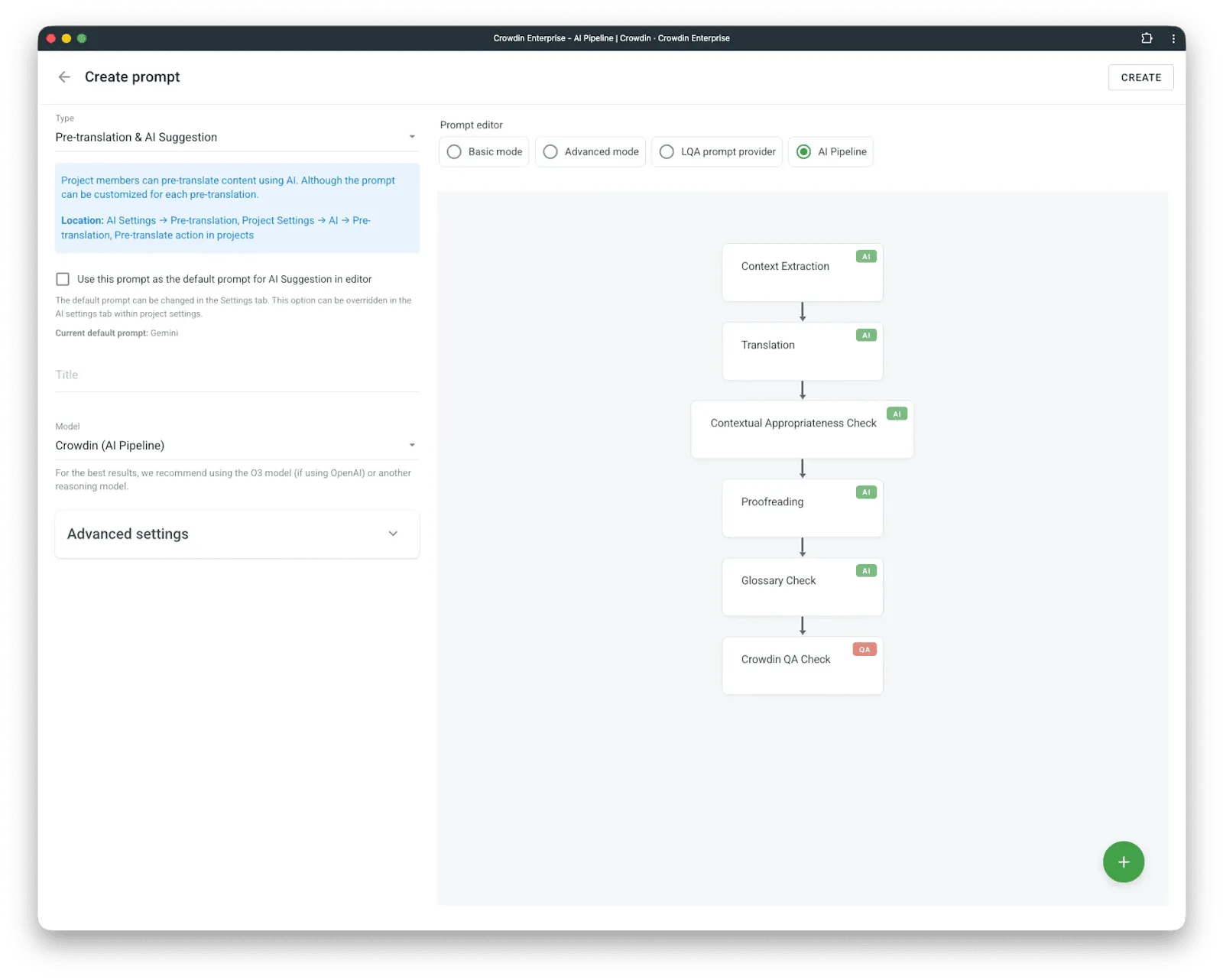
A common concern: Doesn’t running multiple steps mean translating everything multiple times? No. Only the first step generates translations. Every subsequent step receives the output and produces only a diff – corrections, not rewrites. This keeps token costs proportional to error rate, not content volume.
The core assumption: AI can deliver extremely high-quality translation when given proper context and permission to self-correct. The AI Pipeline architecture enables both. It outperforms every other setup we’ve tested.
But the AI Pipeline produces excellent translations – when translation is possible. When we analyze the cases where AI Pipeline fails, we find something interesting: a human translator, given the same input, would also fail (or be unable to translate). The only exception is when humans would do better because they absorb more context naturally than machines can – humans have previous conversations with other humans, remembering previous projects of that client, or were playing the game they localize.
One more example: consider translating “My manager said I performed well this quarter, so they promoted me to senior engineer” into German. The AI faces multiple unknowns: Is the manager male (Vorgesetzter) or female (Vorgesetzte)? Is the speaker male (Ingenieur) or female (Ingenieurin)? The pronoun “they” must be replaced with either “er” or “sie”. That’s three gender decisions in one sentence, none of which can be inferred from the source text. What happens? The AI picks.
This is not a translation-quality or AI-capability problem. It’s an information problem.
Different language pairs require different amounts of additional information to translate unambiguously. English to Spanish is relatively forgiving. English to German requires gender information that English doesn’t encode. English to Japanese requires formality levels, honorifics, and social context. English to Arabic may require determining whether “they” refers to two people or more than two.
From Skipping to Solving
In January, we added “Predict Ambiguity” to the AI Pipeline. Instead of forcing a translation and hoping, the system analyzes source strings and does not attempt to translate if it lacks sufficient information.
This was progress. But skipping is not solving. A localization manager still could face hundreds of flagged strings with no clear path forward. The system basically said “I can’t translate these” but offered nothing more.
Closing the loop: AI Agent for managers
That’s enough background. Here’s what we’re announcing: Сrowdin Copilot.
We suggest a small change to the manager’s workflow. Previously, a manager clicked “pre-translate”, or an automation triggered it. The AI Pipeline ran, produced translations, flagged ambiguities, and translated as much as it could. The managers were supposed to deal with the remaining flags manually.
Now, we have Crowdin Copilot that initiates translation at the human’s request. It launches the AI Pipeline, waits for it to complete, and collects all ambiguity flags – there might be hundreds. The Agent analyzes them, identifies patterns, synthesizes the minimum set of questions to resolve the maximum ambiguity, asks the localization manager, and then returns to the pipeline with answers. Translation completes without uncertainty.
The manager’s job shifts from “resolve 800 flags” to “answer 4 questions”.
Here’s how it works:
- The manager starts pre-translate in chat with the Crowdin Copilot.
- AI Pipeline processes content, flagging ambiguous strings with specific failure reasons.
- Copilot collects all failures and analyzes them for commonalities.
- Then, it synthesizes minimal questions that resolve as many strings as possible.
- Human answers the questions (or AI suggests automated solutions).
- Copilot re-runs the pipeline with the new context.
The question synthesis is where this becomes interesting. The agent doesn’t just group failures – it reasons about what information would unblock them.
For a video game with 800 ambiguous dialogue lines:
“These 800 strings are dialogue involving characters: Cyberworm88, NightOwl, and The Keeper. To translate correctly, I need to know:
- What is Cyberworm88’s gender?
- What is NightOwl’s gender?
- What is The Keeper’s gender?”
For a SaaS UI being localized to Japanese:
“326 strings contain ‘you’ or ‘your’. For Japanese, I need to know the level of formality for user-facing text. Should I use formal (丁寧語) or casual register?”
For documentation with technical terms:
“I found 12 terms used inconsistently: ‘workspace’ appears as both ‘Arbeitsbereich’ and ‘Arbeitsraum’ in your TM. Which is correct?”
Sometimes the answer isn’t a question at all. For UI strings lacking visual context:
“I cannot confidently translate 156 strings that appear to be button labels and menu items. Capturing screenshots from the staging environment for added context.”
The goal is to minimize human input while maximizing translation coverage. We’ve observed the agent reducing 800+ individual ambiguities to 3-5 questions in typical cases.
Some technical information: To get started, make sure to configure Anthropic as one of your AI providers.
The Copilot is accessible via the Organization and Project menus and directly within the Editor. You can select specific models and choose between different AI Agents – sets of specialized settings and prompts tailored for different use cases:
- Ask Agent – A read-only companion. Query your project stats, review string statuses, explore translation memory, generate reports – all without risk of unintended changes.
- Task Agent – Full read + write access to Crowdin. Create tasks, trigger pre-translation, upload files, manage workflows. Before any irreversible action, it pauses and asks for your confirmation – so automation never runs ahead of you.
AI Agent v2 and MCP v2
The news cycle is saturated with AI agents in Crowdin. Coding agents are genuinely impressive right now. Agents are appearing for finance, legal, and healthcare. Crowdin is announcing the second generation of its AI Agent for localization – and MCP v2 alongside it.
Some context on MCP first. The first version was built for a world where LLMs were significantly less capable than they are today. We didn’t implement the full Crowdin API due to context window limitations, and some features (like adding files) were simply impossible to implement reliably.
Recent versions of Claude Cowork demonstrate capabilities that weren’t available when we shipped v1. So before building Agent v2, we rebuilt our MCP. We invite everyone, especially users of agentic tools like Cowork, to try it. For certain workflows, the Crowdin UI becomes optional.
Now, back to Agent v2. This is an early version. This time, instead of focusing exclusively on linguistic tasks, we focused on manager needs (Agent v2 for is coming). Large organizations in Crowdin manage hundreds of projects with wildly different requirements. We hear things like: “In every project where I’m translating markdown files, I want to change the import rules”. Crowdin has an API. We have an app and a vibe coding tool. Solving this with an app is straightforward – but frankly, it’s not obvious that you can or how to start. The Crowdin AI Agent for managers handles these edge cases remarkably well. The Agent can find all projects matching a given criteria, confirm any action with the user before executing, and make the changes.
To be clear about where we see this going: managing localization in a large organization – hundreds of managers, continuous projects, constant configuration changes – we expect the Agent to become an indispensable tool.
One important note on implementation. Crowdin serves a very diverse set of businesses. Some companies use a specific AI provider, while others have that same provider strictly forbidden. Different agents on the market have better or worse characteristics for specific tasks. We wanted to build AI agents in Crowdin the way we build everything else – as a platform. The first implementation is a Claude-based agent, the same foundation that powers Cowork and Claude Code. We’re not yet sure which AI models will come next, but we intend to offer options for companies with the widest range of requirements.
More control with pre-translation queue & prioritization
When you’re handling hundreds of AI pre-translation jobs, waiting for the queue to clear can become a real bottleneck – especially when you have urgent new content (new product launches/hotfixes or seasonal campaigns), needs to go live immediately.
To give you more flexibility, we’ve introduced priorities to the Pre-translation Queue.
Processing massive volumes of content isn’t always instant. Previously, jobs were processed in the order they were created. This meant new, high-priority tasks could get stuck behind a long list of older jobs.
Now, you can decide which jobs move to the front of the line. By assigning a High priority, you ensure that critical content is processed as soon as current jobs are finished.
How to use it: Go to Project > Tools > Pre-translation Queue, find your job, and simply adjust its priority level.
Visibility & UI updates
We’ve also updated the UI to provide more details. Previously, you could only see the “Created at” date, Type (MT/AI), and Status. Now, you’ll also see the Priority, along with “Started at” and “Finished at” timestamps.
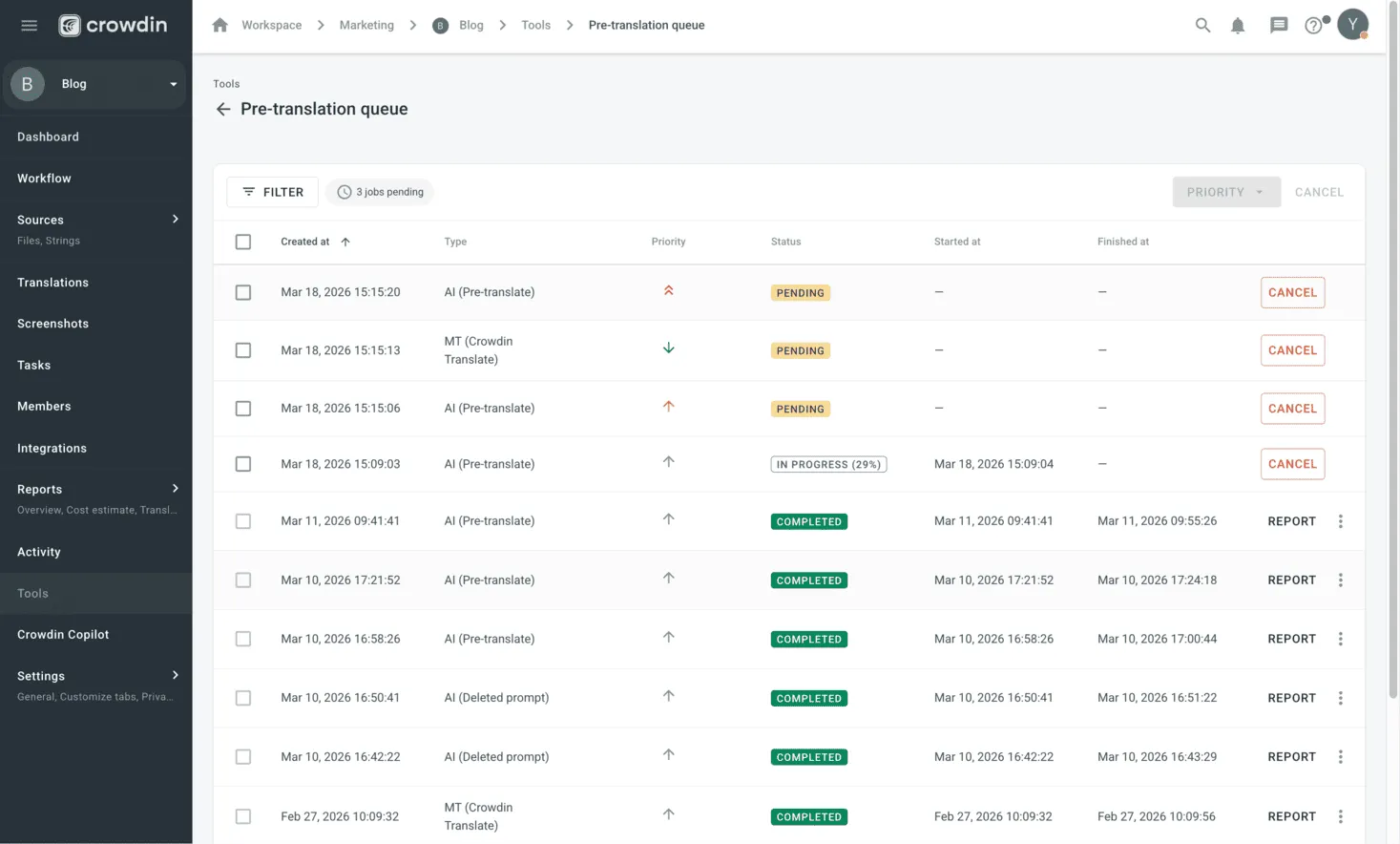
Plus, some small but useful improvements: you can now use Filters (by status, type, and priority) and perform Bulk actions to manage multiple jobs at once.
Security update: enhanced task-based access control
We’ve improved the security and logic of the Task-Based Access Control (TBAC) feature. This update is specifically designed for organizations with strict data segregation requirements, ensuring that work happens exclusively within the assigned scope (meaning the specific files and segments defined in a task).
What’s changed: Access is now determined by the task itself rather than the user’s general role. Even if a user’s role (e.g., Translator or Proofreader) would normally grant broader permissions, they can now only enter the Editor through their specifically assigned tasks. All other entry points to the Editor are now blocked. If a user attempts to access the Editor through any other route, they will see a notification explaining that access is restricted to task-based assignments.
Why this matters (Before vs. Now):
- Previously: If a manager created a task for a user who didn’t have access to a specific language, the system would automatically grant them full access to that entire language. User roles often allowed access to files outside of specific tasks.
- Now: With TBAC enabled, users have access only to the content specified in their task. Their previous project permissions no longer override this – if TBAC is on, you work exclusively with task-specific content.
This update gives managers maximum control over content security, ensuring that linguists stay focused only on the strings they were hired to translate or proofread. To enable TBAC, go to Project Settings > Privacy > Task-Based Access Control.
Rethinking the Editor: From segment-by-segment to document review
CAT tools still follow a side-by-side paradigm: source on the left, target on the right, one segment at a time. The linguist walks through every segment – accepting a TM/MT suggestion, editing it, or translating from scratch. This made sense when machine translation was unreliable, and every segment needed human attention.
Our lab experiments tell a different story now. The AI Pipeline, given sufficient context, produces predictably high-quality translations. It’s hard to commit to a single number — quality requirements vary, language pairs differ in complexity — but we’re consistently seeing 90%+ accuracy across projects with proper setup. You can take a look at how different companies are already using AI to achieve fantastic results (Strava, Suitsupply, MyHeritage). This AI implementation and results change the math on how a linguist’s time should be spent.
In projects where the content is documents – not resource files like game strings or UI labels – we don’t think the segment-by-segment workflow is the most efficient way to review translations anymore. So we’re introducing a new preview option.
What changed
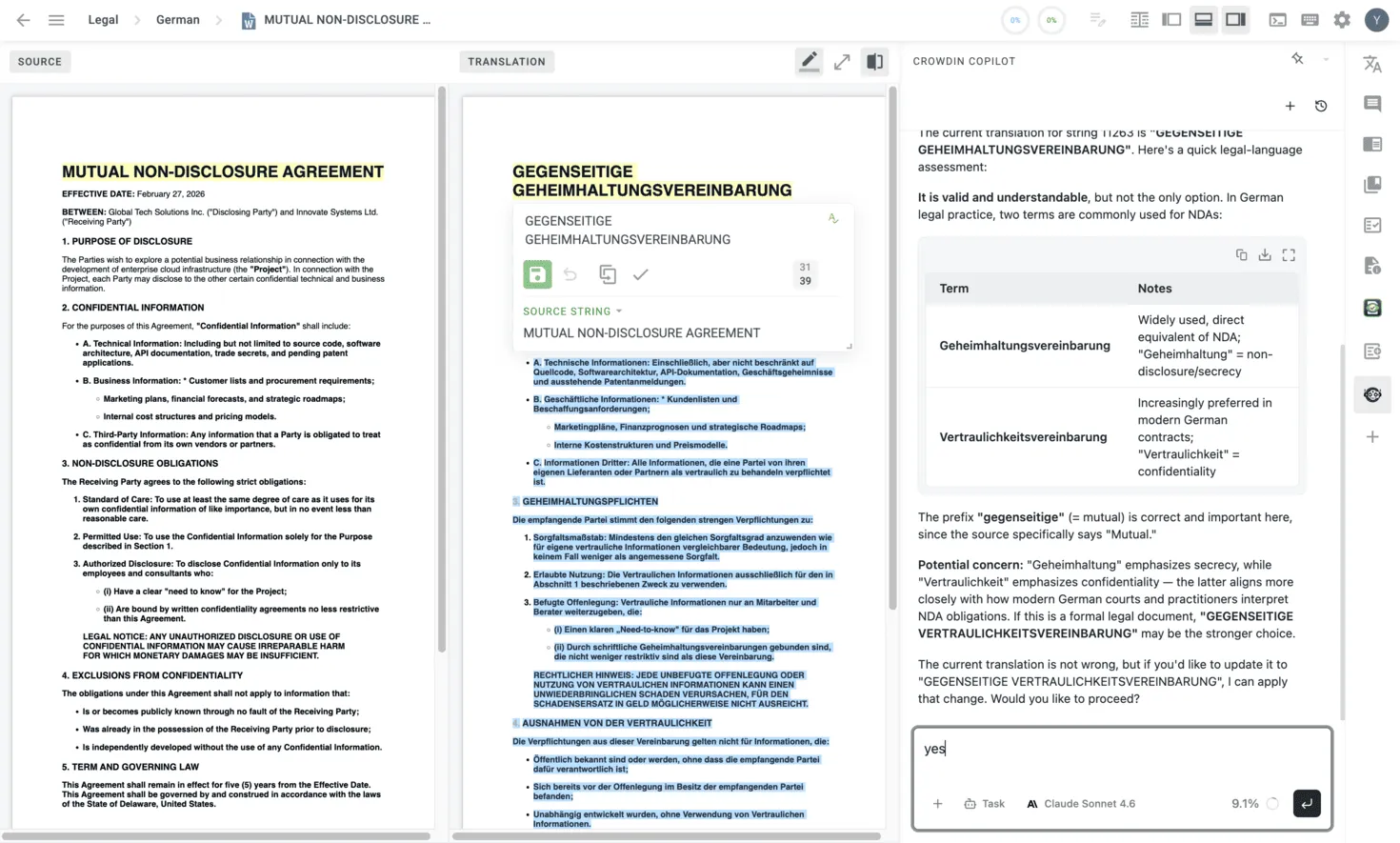
A new button in the editor enables double WYSIWYG mode (Dual Preview). The linguist sees the full source document and the full translated document, rendered as they would appear in their final form. The idea is: instead of evaluating translations one segment at a time, the linguist compares two complete documents side by side – scanning for issues the way a reader would.
The toolset remains available on the right panel: AI Agent chat, TM suggestions, MT engines, style guides, and Crowdin Apps. Clicking any segment still opens it for editing. Nothing is taken away.
But the primary workspace is now the document preview. The assumption behind this layout: when the AI Pipeline does its job well, edits become rare. The editor should optimize for reviewing good translations quickly – not the uncommon case of fixing bad ones.
This is a deliberate shift from ‘translating every segment’ to ‘verifying the document’. The linguist’s role moves from production to quality assurance because, when properly configured, AI makes repetitive tasks redundant. This frees humans to focus on what they are genuinely better at: reading a text and ensuring it actually sounds right.
Style guides: making quality measurable
There’s a running joke in the translation industry: two linguists can’t agree whether a translation is correct. We think the problem isn’t the linguists – it’s that different linguists have different quality standards by default. If requirements were communicated clearly enough, two people and an AI would arrive at the same conclusion.
Another thing we see often at Crowdin: the same LLM model, on very similar content, produces wildly different post-edit distances across clients. Not because the model is inconsistent, but because different clients have different quality expectations. Some need translations that are good enough to be compliant. Others require strict adherence to the latest spelling rules approved by national language authorities. In most projects, three different transliterations of a Greek name into Polish won’t be a problem. But when orthographic consistency matters, every variant except one becomes a critical translation error.
We also thought about a different dimension of this problem. The AI Pipeline can produce extremely high-quality translations – and importantly, consistent ones within a single file, thanks to a dedicated file-level coherence check step. But how do we guarantee consistency across an entire language? When there are thousands of files?
The answer to both problems is style guides. Style guides have been around forever. Many businesses used them primarily for marketing purposes, but they are a perfect fit for translation needs. A style guide almost always answers the questions that resolve linguistic ambiguity: formal or informal communication? Who is the audience? What’s the business context?
This feature is a bit overdue, but we’re happy to introduce style guides as a native feature in Crowdin and Crowdin Enterprise (you can find them in your left-side menu).
How it works
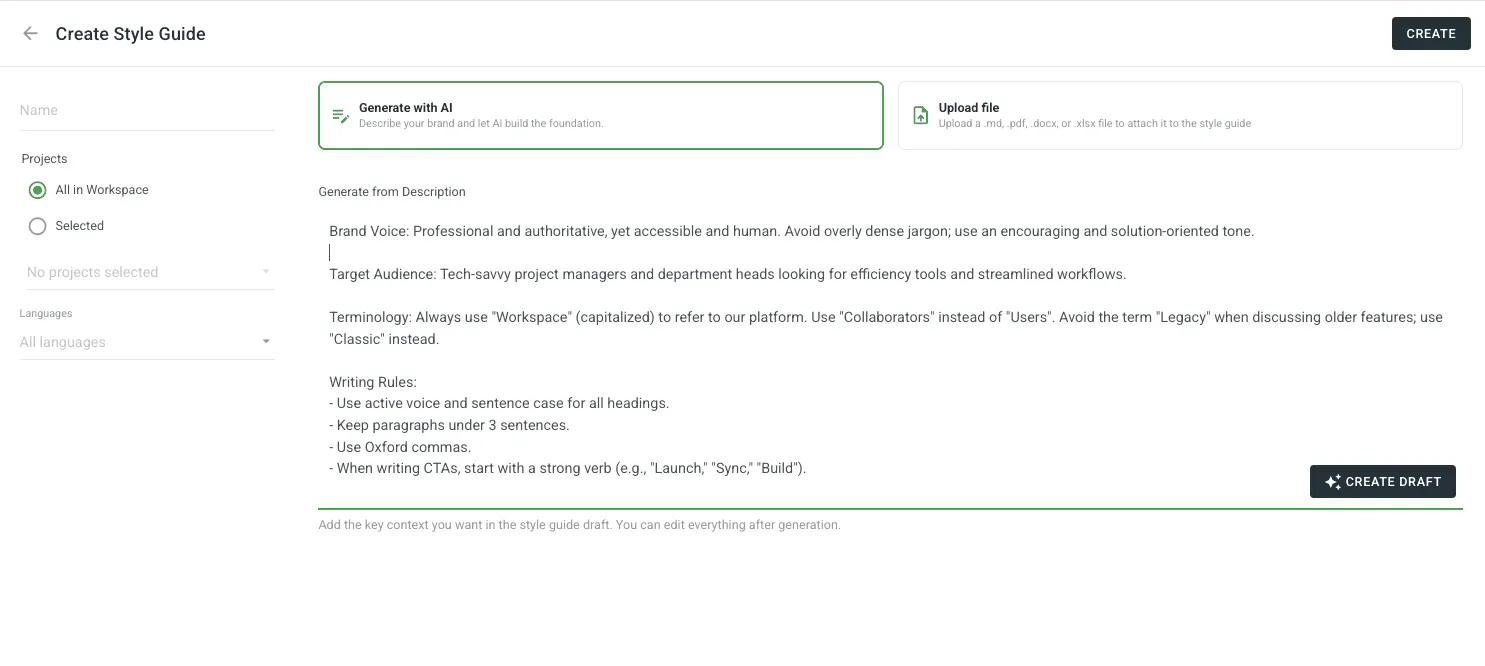
- Generate with AI: Describe your brand voice and target audience, and let Crowdin build a professional style guide for you from scratch.
- Upload existing assets: If you already have a guide, upload it in PDF, DOCX, XLSX, or Markdown.
- Active Guidance: Once set, the style guide isn’t just a document — it’s an active participant. It powers AI pre-translation prompts, provides real-time suggestions in the Editor, and serves as the benchmark for automated AI QA checks to ensure every string stays on-brand.
We’ll be working on templates and general-purpose style guides that can be easily adapted to different business needs. What we recommend right now: if you have style guides, upload them. Give the AI everything you’ve got.
Stay tuned for our next Product Updates!

Crowdin Team